The page of your practice, consultations by type, in your languages.
A page for your practice, appointments by type of consultation with a length, an indicative price, in person or by video, the languages you speak shown, and a booking link for your email signature.
Demonstration data: a fictional business and invented figures.
0 commissionYour customers stay yours. We take nothing on your requests or your appointments: a flat monthly plan, or nothing at all with the free listing.
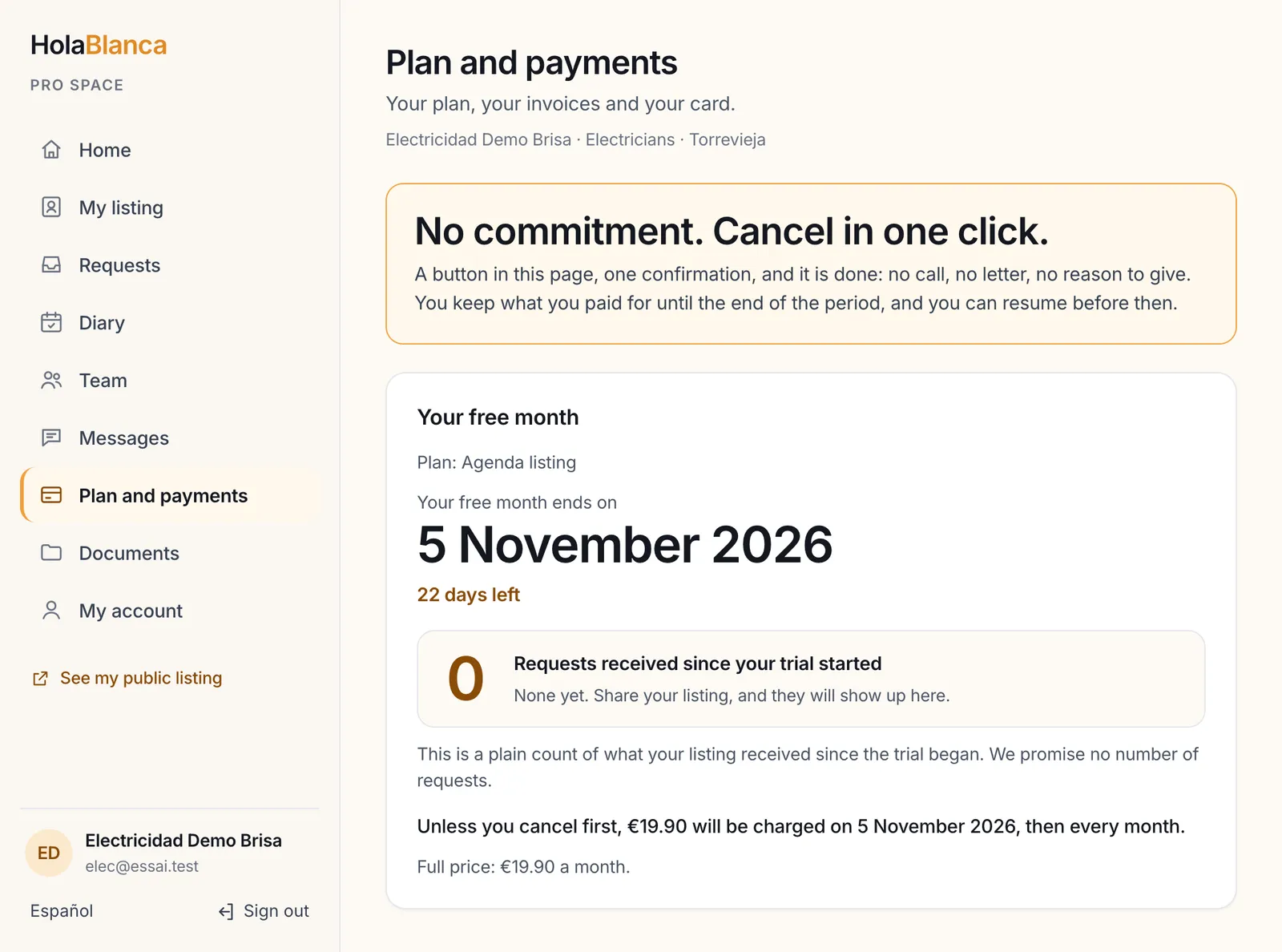
No commitment. Cancel in one click.A button and one confirmation in your dashboard: nothing more is charged, and you keep your plan until the end of the period you paid.
5 languagesYour page, your contact form and your booking pages speak Spanish, English, French, German and Dutch, so visitors read you in their own language.
What a practice gains
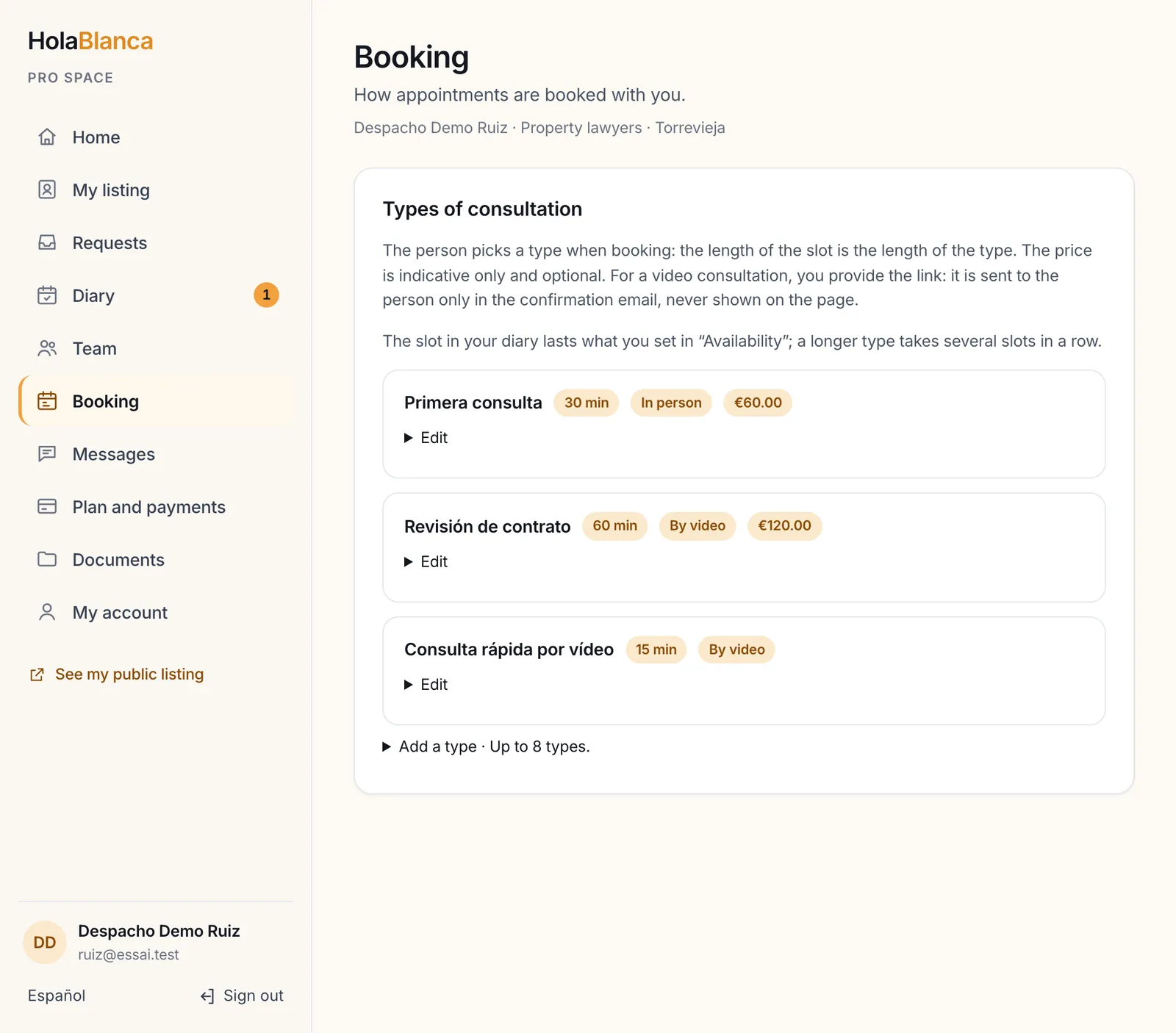
Clients who book the right consultationA first consultation of 30 minutes, a contract check of one hour by video: the client picks, and the slot has the right length.
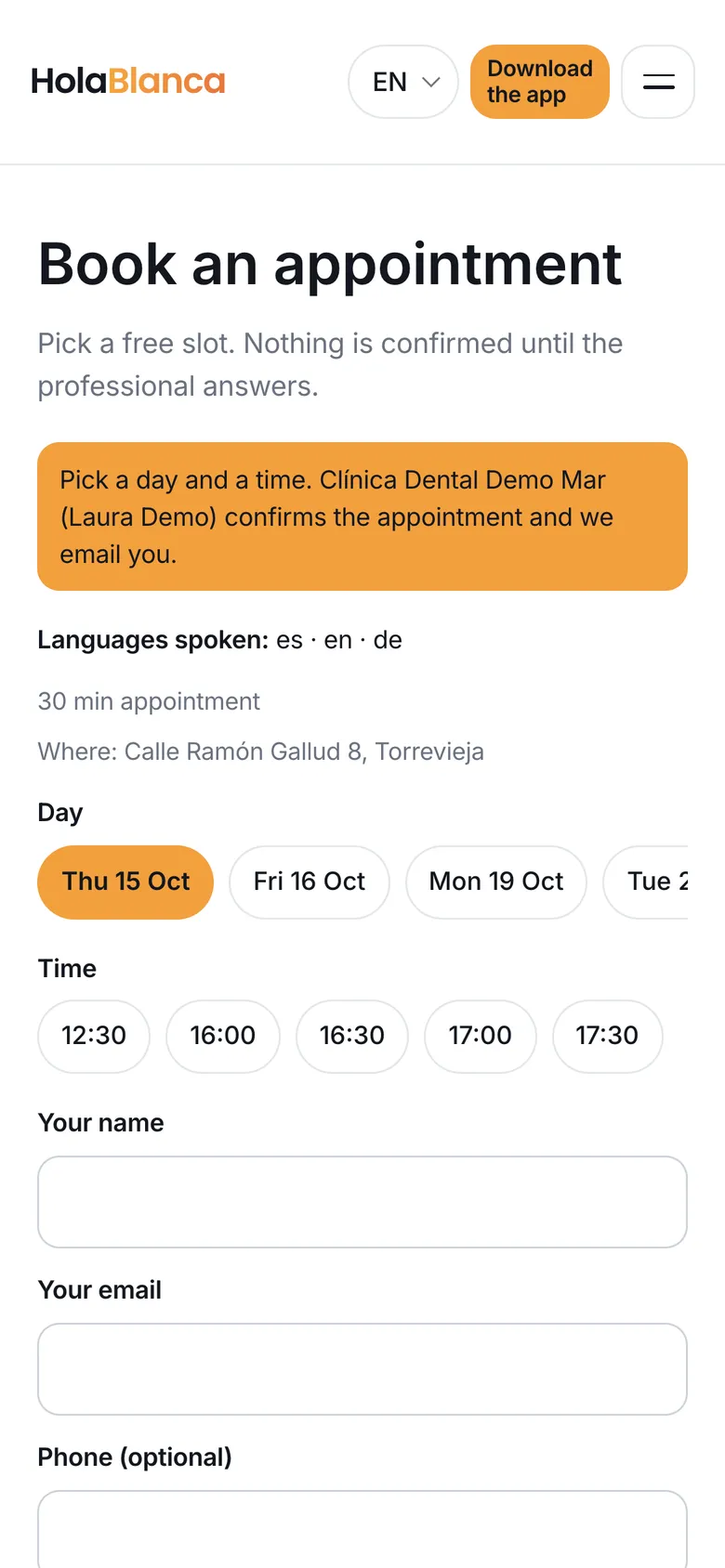
Your languages on the pageThe languages of your practice, taken from your listing, show on your page and on the booking page, which reads in five languages.
A booking link for your signatureFree hours only, never the name of a client. You can revoke it and make a new one.
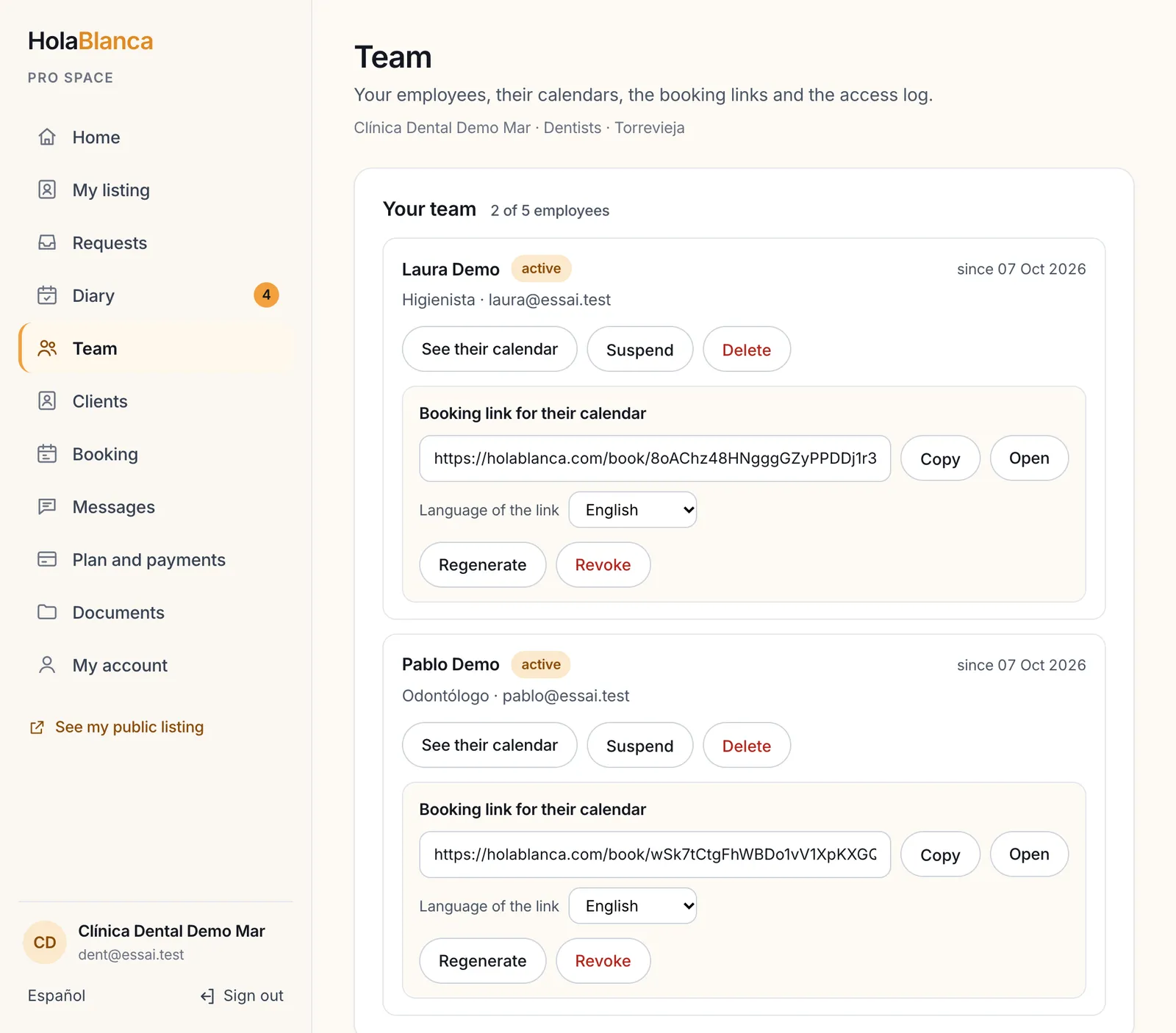
Your colleagues' calendarsUp to five employee accounts, each with their own calendar. You see everything.
01
Your own page in the directory
Who it is for: Every business, free listing included
Each business has its own page in the HolaBlanca directory, with an address of its own that you can share on a card, in an email or in a message. It shows your name, your address, the languages you speak, your logo and your photos. With a paid plan it also shows your phone, a WhatsApp button and your website, and the contact form sends the message straight to you.
What it changes for you
Claim your listing for free, then add your logo and up to six photos
Paid plans: phone, WhatsApp button and website on your page
Your page reads in five languages: Spanish, English, French, German, Dutch
Demonstration data: a fictional business and invented figures.
02
Appointments by type of consultation
Who it is for: Lawyers and gestores on the Pro plan
You define up to eight types of consultation: a name, a length, an optional indicative price, in person or by video. The person picks a type when booking, and the slot lasts the length of the type. For a video consultation you provide the link: it goes to the person only in the confirmation email, never on the public page.
What it changes for you
An optional intake question, with a warning not to write professional secrets or sensitive data
The languages of your practice, taken from your listing, are shown on your page and on the booking page
Your booking link goes in your email signature; no two appointments can overlap
Demonstration data: a fictional business and invented figures.
03
Your calendar of appointments
Who it is for: Agenda and Pro plans, every trade
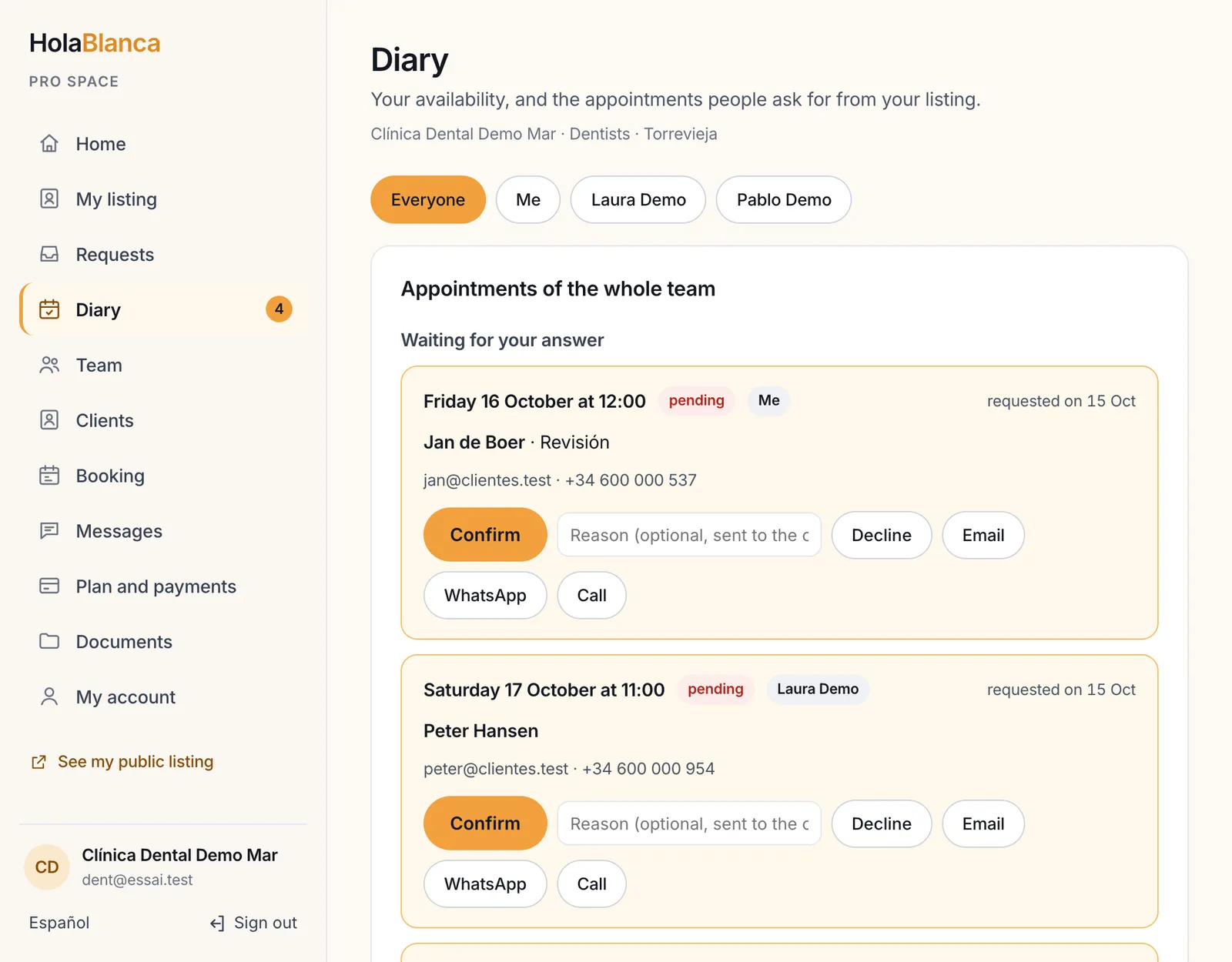
You tick your free hours, visitors pick a slot on your page, and you confirm or decline with one click. Nothing is confirmed without you. Each request arrives in your diary with the pending ones first, and next to it the buttons to answer by email, on WhatsApp or by phone.
What it changes for you
Free hours day by day, appointments from 15 minutes to 2 hours, minimum notice, closed days
You confirm, decline or cancel, with a reason sent to the customer
The confirmation email carries a calendar file for the customer's diary
The customer gets a reminder by email the day before
Demonstration data: a fictional business and invented figures.
04
A booking link to share
Who it is for: Pro plan, with an agenda
Every calendar has a public link: yours, each employee's, and one for the whole team. Put it in your email signature, on a card, in a message or on your own website. The visitor sees free days and hours only, never the name of a customer, and books after ticking a consent box. The appointment is born pending: nothing is confirmed without you.
What it changes for you
You can revoke a link and make a new one: the old one stops working at once
With the team link, the appointment goes to an employee who is free at that time
The page is in five languages and is never indexed by search engines
Demonstration data: a fictional business and invented figures.
05
Your team, one calendar each
Who it is for: Pro plan, with an agenda: agencies, clinics, salons, practices
You create up to five employee accounts from your dashboard: a name, an email and a role. Each employee receives a personal link to choose a password, then manages their own calendar and sees nothing else. You see everything, and you can filter by employee. You can suspend or delete an account whenever you want.
What it changes for you
The invitation link is valid for 7 days and works once
An access log shows who saw or changed what, with no customer name and no IP address, kept 12 months
If the Pro plan stops, the team is paused and nothing is deleted
Demonstration data: a fictional business and invented figures.
A free month to try it, one click to stop
Paid monthly plans start with a free month, once per business, with the card asked up front. The date the month ends is shown in big letters in your dashboard, next to a plain count of the requests received since it began. Unless you cancel first, the first monthly payment is taken on that date. To stop, press Cancel my subscription and confirm: nothing more is charged, and you keep your plan until the end of the period.
The end date of the month, in big letters
A button and one confirmation to cancel
Demonstration data: a fictional business and invented figures.
Four plans, one rule
Agenda plan19,90 € a month
Everything in Local
A calendar of appointments on your page
Not offered to estate agencies
Pro plan39,90 € a month
Everything in Agenda
A team of up to five employees, a booking link per calendar
Open requests from all the towns you cover, and the tools of your family of trades
The calendar is in the Agenda plan. The types of consultation, the booking links and the team are in the Pro plan. See all plans and prices
No website needed. A site of your own stays possible.
Your page in the directory is a real page with an address of its own: print it on a card, put it in your email signature, send it in a message. A booking link does the same for your calendar. If you already have a website, keep it: your page shows it with a paid plan. A page here does not replace a domain of your own.
An address of your own to share
Your own website, if you have one, shown on your page (paid plans)
A booking link for your signature and your cards (Pro plan with an agenda)
Not at ease with a computer? We set it up for you
With your written agreement, we prepare your page from your details, then spend about 30 minutes with you, by phone, video or in person, to set up what your plan contains. You stay in charge of everything, and you choose your own password.
No. You provide the link for a video consultation, and it goes to the person only in the confirmation email. It is never shown on the public page.
Is the price binding?
No. The price of a type of consultation is optional and indicative only, and the page says so. You decide what you charge.
What about the intake question and professional secrecy?
The question is optional and free text. The person is warned not to write professional secrets or sensitive data in the answer. Ask only what you need to prepare the appointment.
Do I need a website?
No. You can start with your page here, which has an address of its own to share. If you already have a website, keep it: your page can show it. A page here does not replace a domain of your own.
Can I cancel easily?
Yes. There is no minimum term. In your dashboard you press Cancel my subscription and confirm once: no call, no letter. You keep your plan until the end of the period you paid, and nothing more is charged.